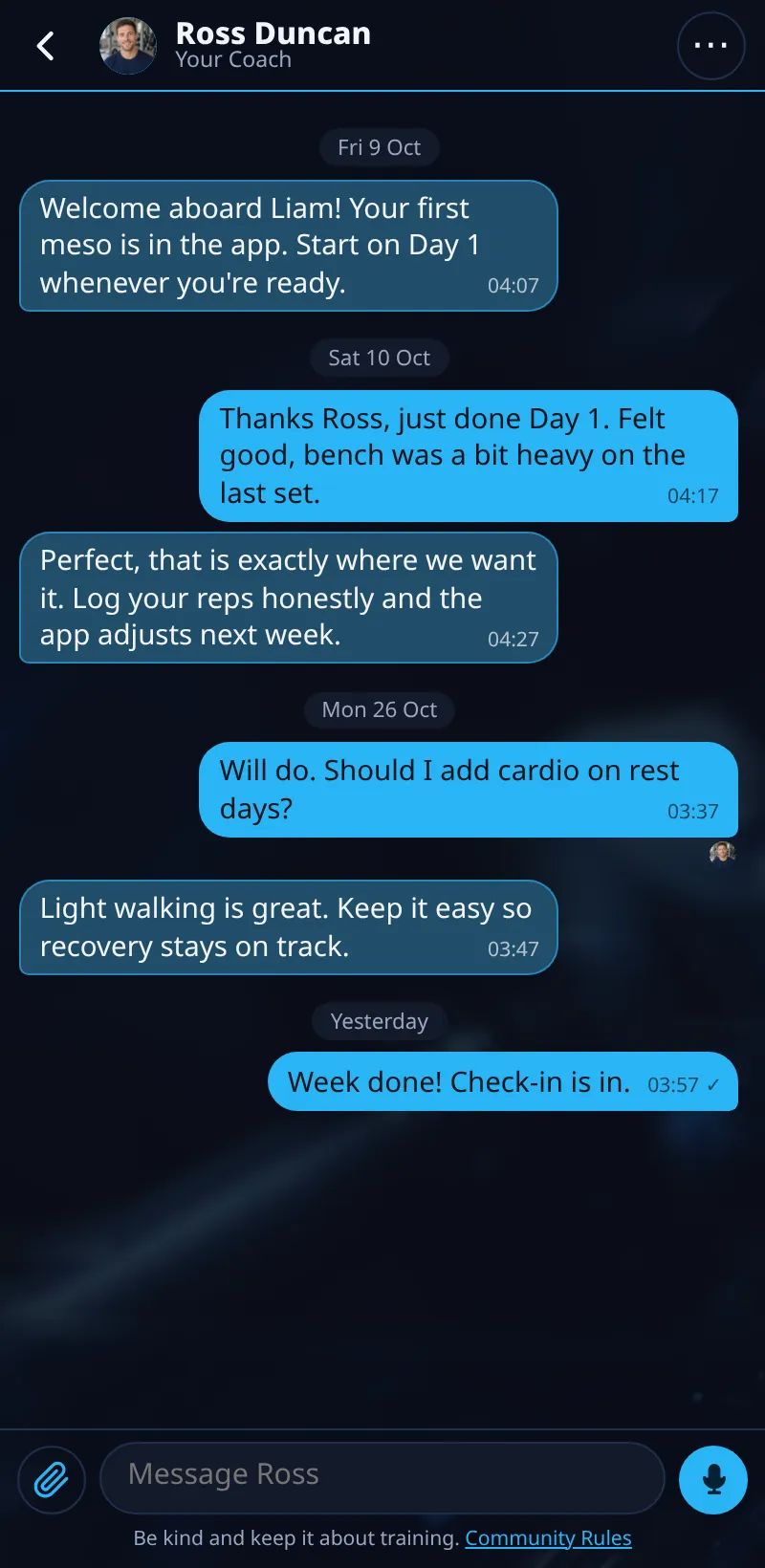
Messages With Your Coach
Chat with your coach in the app.
Step By Step
- Open the Coach tab, or tap Open Chat on the Train screen.
- Tap Messages.
- Type your message and tap Send. With the box empty, tap the microphone to record a voice note.
- A number on the Coach tab means a new reply.
Good To Know
- Ticks show ✓ sent and ✓✓ delivered. Your coach's small photo appears under the last message they've seen.
How It Works
Messages keep everything about your coaching in one place: replies to your check-ins and form checks land here too. Tap your coach's photo to see it larger, with their specialisms underneath.
Your coach's replies to your check-ins and form checks land in the same chat, so the whole conversation stays together. Each chat is private between you and your coach, and you can scroll back through everything you've sent, including voice notes and form check replies.
Common Questions
Will I get a notification?
Yes, if you turn on notifications. Meso Gym explains why before your phone asks.
Can other clients see my chat?
No. It's just you and your coach.
In the demo, sending messages shows Available In Your Trial.
Clients get this in the app their coach invites them to. Coaches can see it the way a client does with See As Client in Demo PT.