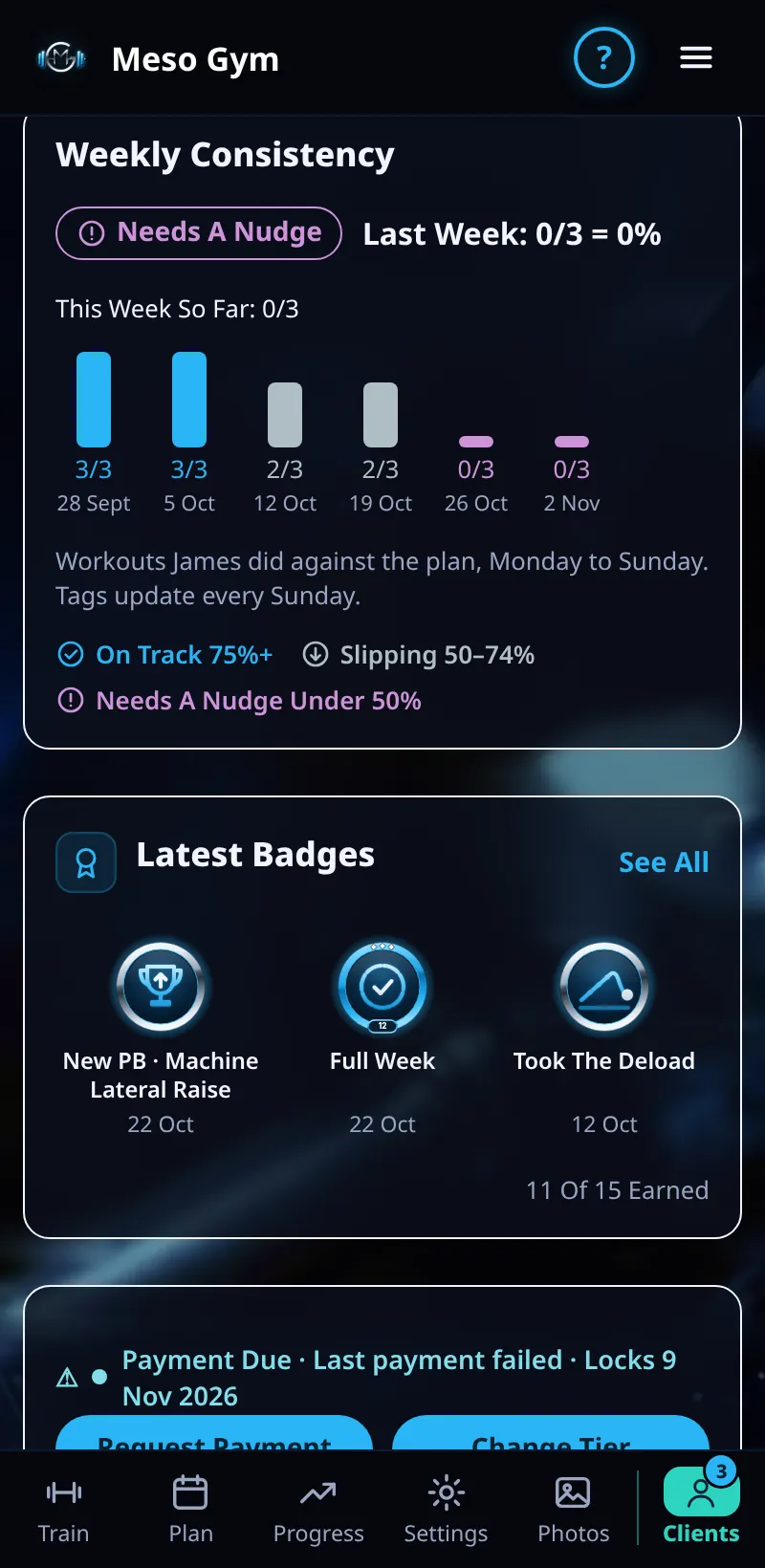
Weekly Consistency
See how many planned workouts each client completes every week, so you spot a slipping client early.
Step By Step
- Open a client from the Clients tab.
- Weekly Consistency is the first card on Overview. It shows Last Week (for example 4/4 = 100%) and This Week So Far.
- Below that, one bar per week shows the workouts they did against the plan, Monday to Sunday.
- Missed and skipped workouts are counted separately, so you can tell a planned skip from a missed day.
- The tag key explains each level: On Track 75%+, Slipping 50–74%, Needs A Nudge Under 50%.
Good To Know
- Tags update every Sunday.
- Consistency also feeds Needs Attention: a client who falls behind shows up under Needs A Nudge or Inactive.
How It Works
When a client is slipping because they missed workouts, the card says so in plain words, for example that they missed 3 of their last 4 planned workouts. That gives you something specific to talk about rather than a percentage.
Common Questions
Does a skipped workout count against the client?
A skip is shown separately from a miss, so you can see the difference.
When does This Week So Far reset?
Each Monday, as weeks run Monday to Sunday.