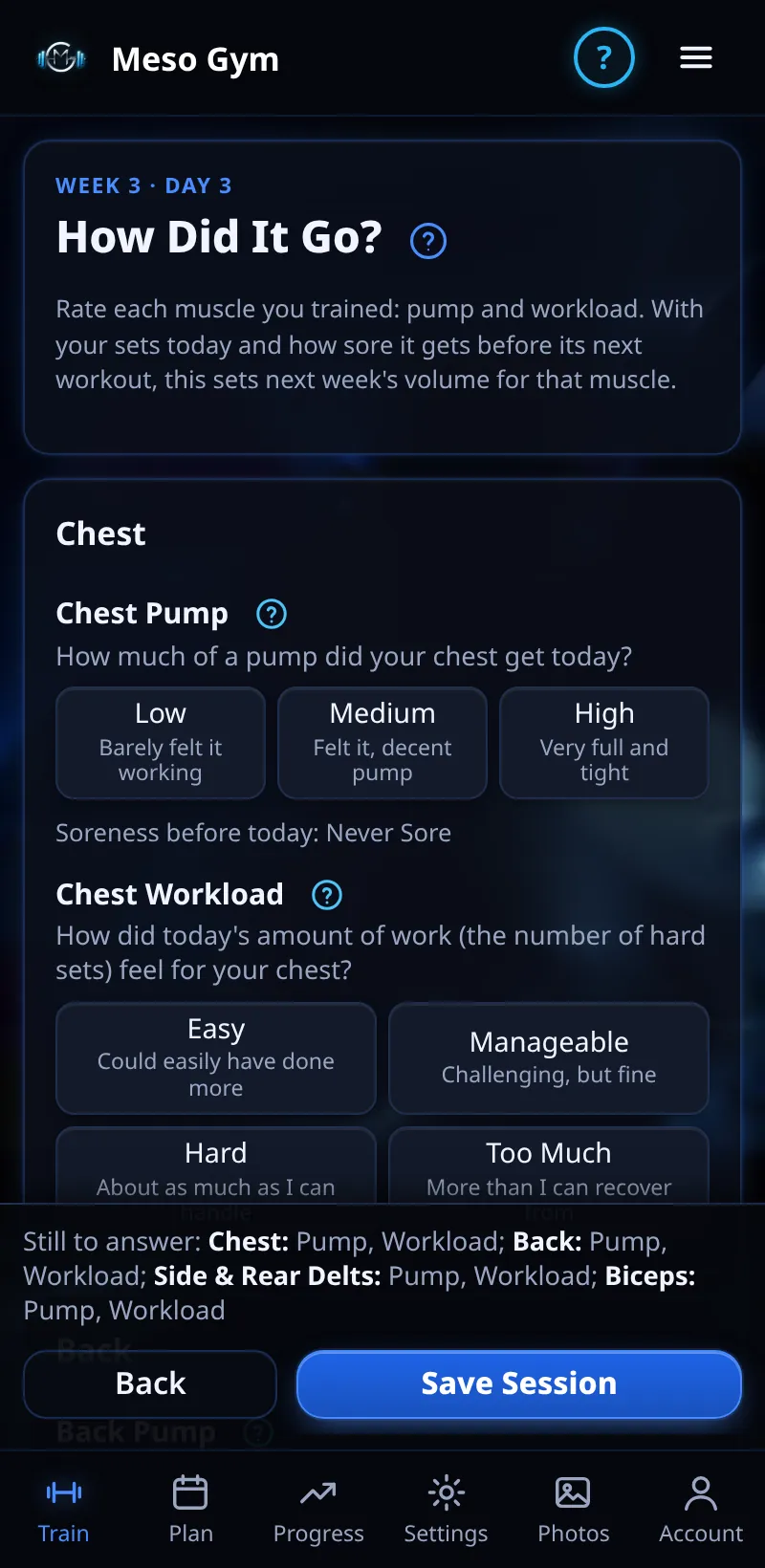
Feedback After A Workout
A few quick questions after each workout set next week's sets and weights.
Step By Step
- Finish your workout: tap Finish & Give Feedback.
- The How Did It Go screen asks about each muscle you trained: Pump (Low, Medium, High) and Workload (Easy, Manageable, Hard, Too Much).
- Tap Save Session. Meso Gym uses your answers to set next week's sets.
- Session Saved shows each exercise with what's planned next week: more sets, fewer sets, or Hold Sets.
Good To Know
- Each question has a small Help tip that explains every answer.
- The last hard week and the deload ask no feedback.
How It Works
More sets come when you recovered early and the work felt easy or manageable. Sets stay the same when it felt hard or soreness only just cleared, and come down when you're still sore, it was too much, or your sets went backwards. Changes are small and gradual. Save without answering everything (Save Anyway) and those muscles simply repeat next week.
Common Questions
What does May Change After Soreness Check mean?
Your next How Sore Are You answer can still change it.
Can I edit a finished workout?
No. A finished workout is locked; opening it shows a read-only Session Summary.